
If you’ve invested in a UniFi ecosystem for your business or smart home, you already know that Ubiquiti’s ecosystem is built for reliability, scalability, and professional-grade performance.
But here’s the problem: great networking infrastructure means nothing if your audio distribution can’t keep up.
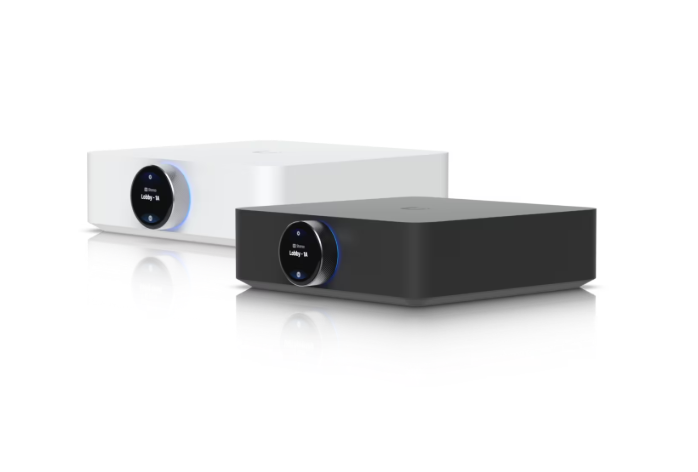
That’s where the UniFi PowerAmp comes in — a high-fidelity speaker amplifier designed to seamlessly integrate with your UniFi network and deliver studio-quality sound across multiple zones.
In this guide, we’ll break down what the PowerAmp is, how it works, who needs it, and most importantly — how to get it installed and working in your Michigan facility.
What is the UniFi PowerAmp?
The UniFi PowerAmp (UPL-AMP) is Ubiquiti’s premium speaker amplifier engineered for:
- Multi-zone audio streaming — control and distribute audio to different areas independently
- High-fidelity sound — designed for commercial-grade clarity and power output
- Network integration — manages directly through the UniFi ecosystem (same controller as your networking equipment)
- Spatial audio support — enhanced audio processing for immersive sound experiences
- PoE+ compatibility — can operate over Power over Ethernet in supported configurations
Unlike consumer-grade amplifiers that sit isolated on your shelf, the PowerAmp is built for enterprise environments where audio distribution is part of a larger connected infrastructure.
Common Use Cases for the PowerAmp
Office Environments
- Paging and announcements across multiple departments
- Background music in lobbies, break rooms, and common areas
- Conference room audio reinforcement
Retail & Hospitality
- Synchronized in-store music across zones
- Ambient audio management for restaurants/bars
- Event audio distribution
Residential Smart Homes
- Whole-home audio system backbone
- Home theater integration
- Multi-room entertainment control
Educational & Healthcare Facilities
- Classroom audio reinforcement
- Hospital/clinic zone-based announcements
- Large facility audio distribution
How the UniFi PowerAmp Works
The PowerAmp connects to your UniFi network and is managed through the UniFi Network Controller — the same dashboard where you manage access points, switches, and security cameras.
Each PowerAmp can drive up to 4 speaker zones independently, with individual volume and source control for each zone through the UniFi controller app.
Why Choose the UniFi PowerAmp?
Unified Control
Instead of managing audio through a separate system with separate credentials, everything lives in the UniFi controller. Your IT team already knows how to use it.
Scalability
Need audio in 1 zone or 10? The PowerAmp architecture scales without requiring separate control systems, expensive cloud subscriptions, or proprietary licensing.
Enterprise Reliability
Built to the same standards as UniFi networking equipment with redundancy-ready architecture, detailed logging, and remote management.
Cost-Effective
Compared to separate audio infrastructure plus separate control systems, UniFi’s integrated approach cuts installation costs by 30-40%.
UniFi PowerAmp Installation Requirements
Network Requirements
- UniFi Network Controller (cloud or on-premises)
- PoE+ switch (for powered connectivity)
- Cat6A Ethernet cabling (recommended per BICSI standards)
- Adequate bandwidth
Electrical Requirements
- Dedicated circuit recommended (120V or 240V per NEC Code)
- Proper grounding
- UPS backup (optional but recommended)
Audio Infrastructure
- Speaker selection (8Ω speakers recommended)
- Speaker wire/cabling
- Audio sources (Sonos, microphones, AV receivers, etc.)
- Input cabling (RCA, XLR, optical)
Installation Process
Step 1: Site Assessment — Determine zones, room sizes, acoustics, and audio sources.
Step 2: Equipment Selection — Order PowerAmp from Ubiquiti Store, PoE+ switch, cabling, speakers, and accessories.
Step 3: Network Preparation — Add PowerAmp to UniFi network, assign static IP, configure zones.
Step 4: Physical Installation — Mount equipment, route cables (per BICSI installation standards), connect audio inputs/outputs.
Step 5: Audio Source Integration — Connect Sonos, microphones, VOIP, and test all paths.
Step 6: Zone Configuration & Testing — Map zones to spaces, set volumes, verify audio quality.
Step 7: User Training — Train staff on mobile app control and provide documentation.
UniFi PowerAmp Installation Cost Breakdown
Equipment Costs
- UniFi PowerAmp (UPL-AMP): $300–$500
- PoE+ Switch: $500–$2,000
- Cabling & Accessories: $200–$500
- Speakers: $500–$3,000+
Installation Labor
- Site assessment & planning: 2–4 hours ($200–$400)
- Equipment installation & cabling: 4–8 hours ($400–$800)
- Network configuration: 2–3 hours ($200–$300)
- Audio tuning & testing: 2–4 hours ($200–$400)
- User training & documentation: 1–2 hours ($100–$200)
Total Project Cost: $2,600–$8,100
- Small single-zone system: $2,600–$3,500
- Medium 4-zone system: $4,000–$6,000
- Large multi-floor installation: $6,000–$8,100+
Why Wolverine Low Voltage for UniFi PowerAmp Installation
We’re a UniFi Professional Integrator with 10+ years of experience installing Ubiquiti equipment across Michigan. We understand network design, professional installation, and system integration in compliance with BICSI standards and NEC Code.
We serve Ann Arbor, Detroit, Lansing, Grand Rapids, and throughout Michigan’s lower peninsula.
Ready to Upgrade Your Audio System?
Contact Wolverine Low Voltage today for a free estimate on your UniFi PowerAmp installation.
Call us at (313) 899-5420 or get a free quote online.


